Start with what you know
No birth time. Still a chart worth reading.
Your birth date and place can support useful planetary information. Without a reliable time, the rising sign, Midheaven and houses remain unconfirmed; fast-moving placements and precise contacts can also change. Keep those limits visible.
Free, with the limits shown
Choose unknown rather than guessing
Your chart
Start with your planetary picture.
Use the unknown-time checkbox if the clock time is not supported. The preview is free and does not need an account.
Three different inputs
Precision belongs to the source
A reliable recorded time
Use the local clock time, birthplace and date from a reliable record. The correct historical time zone matters. A suitable time supports angles and Whole Sign houses; it does not make an interpretation a measured fact.
An approximate interval
“Between 07:00 and 07:15” is an interval, not 07:07:30. Keep the endpoints and how they were obtained. A rising sign, house or contact is supported only to the extent the relevant bounds support it. The guest app does not take an interval; do not present a guessed midpoint as exact.
An unknown time
Start with the actual local birth date and place. A full-day calculation can retain alternatives when a planet changes signs. A local day is not always 24 hours: daylight-saving and historical clock changes matter. A date without its time zone can describe the wrong UTC interval.
An actual range example
One date can contain two signs
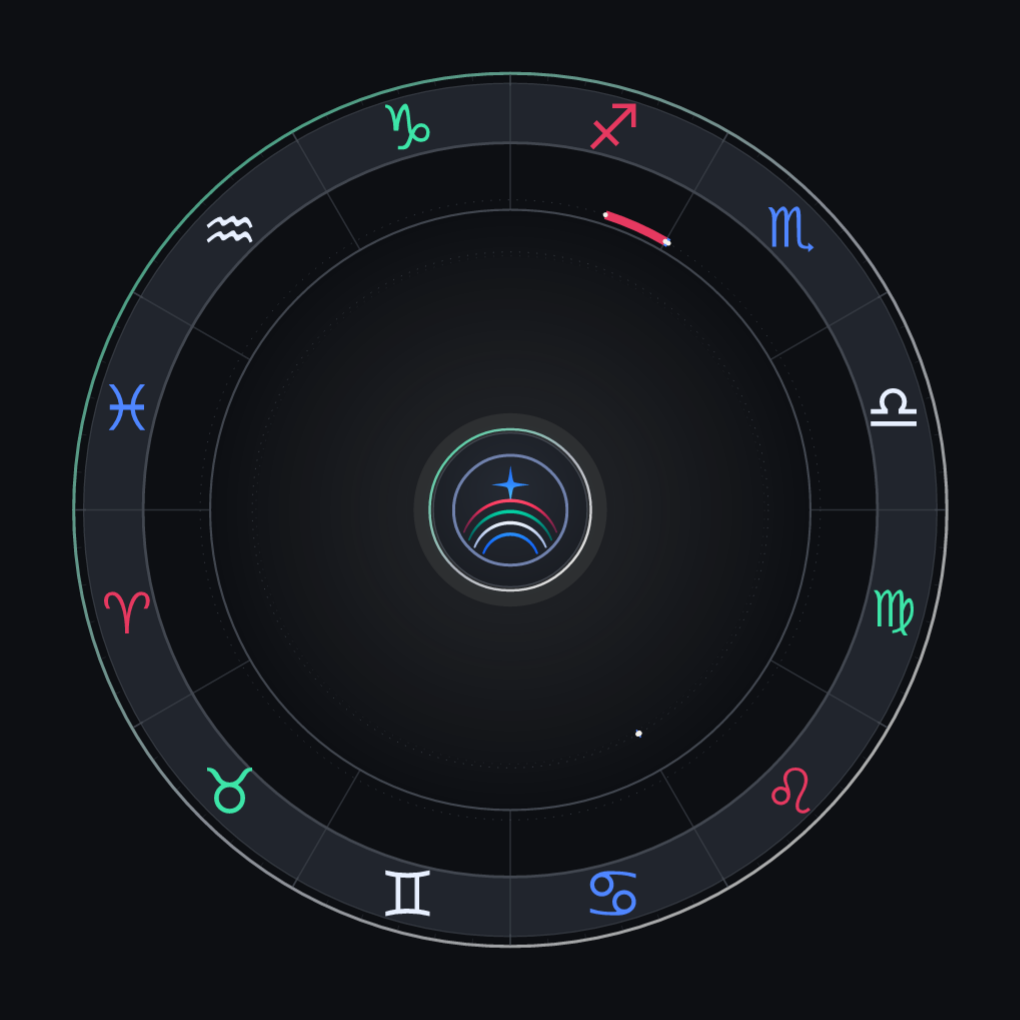
Quinn Cedar is a separate fictional fixture, born on 3 November 2024 in New York with no supplied time. Its actual local-day interval runs from 04:00 UTC on 3 November to just before 05:00 UTC on 4 November: about 25 hours. The report shown covers 1-30 January 2027; those forecast dates are not the birth-day interval.
What stays supported
The source calculation keeps Quinn's Sun in Scorpio across the permitted interval. It does not claim one exact birth degree. The Moon can be in late Scorpio or Sagittarius; Mars can be in late Cancer or early Leo. These are calculated alternatives, not a choice based on which description sounds more appealing.
Read the range wheel in words
- Moon: Scorpio 29.3270° to the boundary, or Sagittarius 0° to 12.1241°.
- Mars: Cancer 29.6524° to the boundary, or a small Leo possibility up to 0.0119°.
- No rising sign, Midheaven or natal house is asserted from a placeholder time.
The source uses numerical sampling and refinement with a stated boundary allowance. These are the candidate's supported ranges, not a formal proof of every ephemeris value.
Which workflow are you using?
The free app and a standalone reading differ
In the current free guest preview
Danu computes a local-noon reference when unknown time is selected. Rising sign, Midheaven and houses are omitted. Fast bodies near a sign boundary are withheld using estimated motion; this is a heuristic, not a full-day set of charts. A sign supported by that check is still not an exact birth degree.
The guest prose may discuss a Moon sign when its check permits it, while the wheel omits the Moon. Natal Moon and angles do not anchor guest transit claims. Other guest contacts are qualified as noon-reference calculations. The separate written natal introduction omits Moon, houses and angles for unknown time. These safeguards do not certify every account feature as a full uncertainty calculation.
In a standalone order
The current standalone listing describes full possible planetary ranges across the local birth date and conditional sign interpretations. Unsupported houses and angles are omitted. Keep approximate bounds and unknown precision explicit. The offline range wheel above demonstrates that approach; it does not mean the same range engine is shipped inside the app.
Kenton reviews standalone orders before delivery. That review is distinct from automated app readings. Use the selected listing's current requirements, terms and delivery window, which can differ by storefront.
Read the standalone forecast requirementsIf you want to narrow it
Find a record, not a convincing guess
Keep the source with the time
A birth certificate or hospital record may contain a time, depending on the record and jurisdiction. A family recollection can be useful, but keep its uncertainty. Check local clock conventions, date boundaries and time zone before treating a value as precise. A chart that sounds familiar does not verify a clock time.
For a gift, ask for the information the recipient is comfortable sharing and mark unknown honestly. Do not put another person's birth details into public examples or analytics.
Inspect the annotated standalone sample, read Danu's method, or see the general FAQ. Premium reports remain a separate app feature.
Common questions
Unknown birth time, answered
Should I enter noon if I don't know my birth time?
Choose the unknown-time option. The app uses local noon internally as a reference and marks the result unknown-time. Noon is not your verified birth time, so it cannot establish houses, rising sign or Midheaven. Do not enter noon as an exact time just to complete a form.
Can I know my Moon sign without a birth time?
Sometimes the relevant interval stays in one sign; sometimes it crosses a boundary. The free guest preview uses an estimated-motion sign check and can discuss a Moon sign when that check permits it. Its wheel omits the Moon and its written natal introduction omits Moon facts. This is not the same as calculating the full birth-day range.
What if I know only an approximate time?
Keep the actual interval and its source, such as between 07:00 and 07:15. Do not convert it into a supposedly exact midpoint. The app's guest form has known-time or unknown-time choices, not an interval input; use unknown when an exact time is not supported. For a standalone order, record the precision and bounds and follow that listing's instructions.
Can I add a reliable time later?
Yes. Recompute the guest chart with the reliable time, or update your account chart through its chart setup. A guest preview is not an account-stored chart. If you already purchased a standalone report, ask about its correction terms rather than assuming an automatic replacement.